COMMENTING / TELEGRAM + X

Auto commenting for Telegram + X
In one app.

Automate commenting in Telegram and X. Connect accounts, set up your workflows and track execution — on your Windows PC.

See how it works ↓

1 Telegram + 1 X free. No card. No time limit.

On your phone?
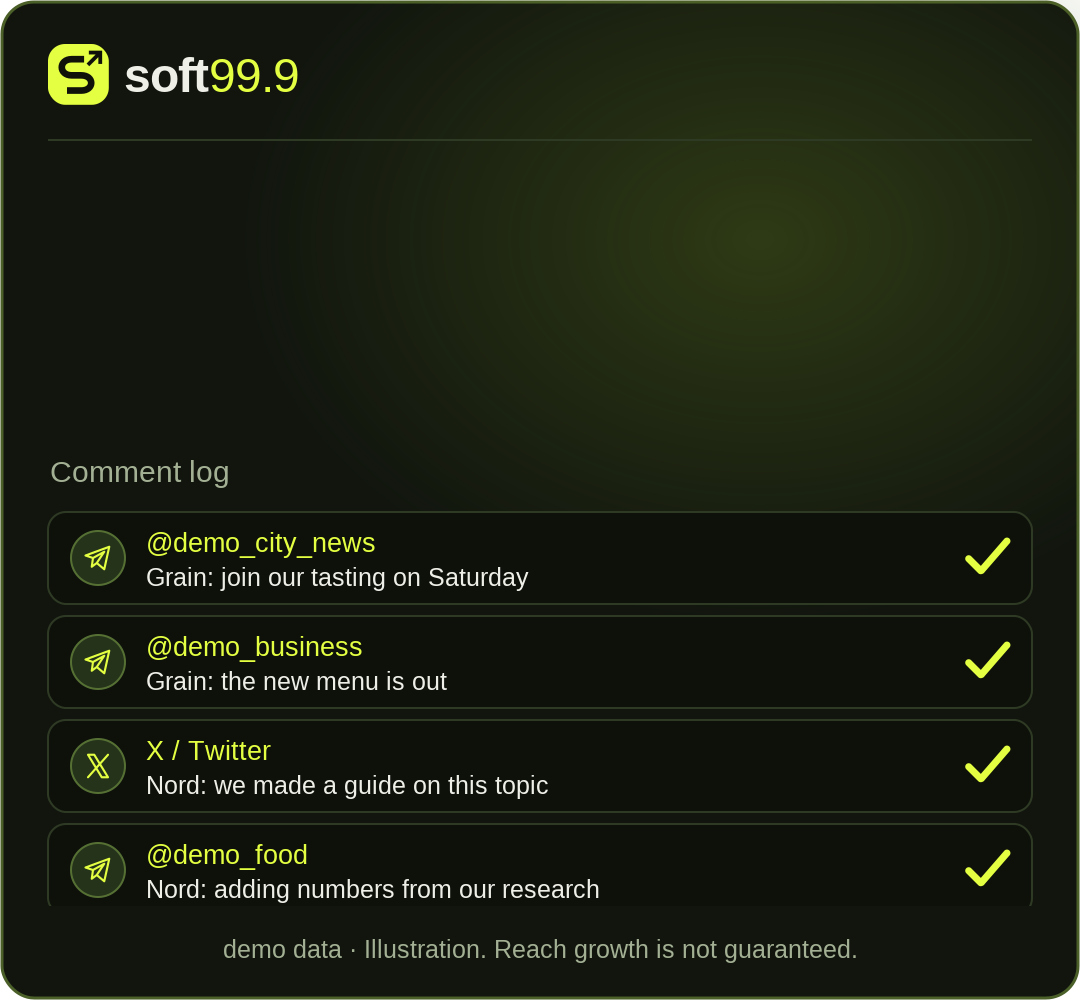
Illustration: sent comment counter, Telegram and X log. Demo data, reach growth is not guaranteed.
VIDEO / 26 SECONDS

The whole path.
From setup to comments.

Six steps: setup, accounts, channels, topic, start and log. The video uses demo data.

Illustration. Reach growth is not guaranteed: results depend on content, accounts and the platform.

01 / FIRST LAUNCH

Download. Configure.
Try it with Free.

Get to know the product before paying. Start with one account and a simple workflow.

  1. 01

    Download and install the app

    Windows 10 / 11 x64. Run Soft-99.9-Setup-0.5.4-x64.exe and follow the setup steps. Shortcuts will appear on your desktop and in Start.

  2. 02

    Create a Soft 99.9 account

    Register, confirm your email and sign in to the client. Free requires no payment.

  3. 03

    Connect and try it

    Add your Telegram or X account, configure a workflow and check your first run. Connect the other module when you need it.

Have these ready

Your Telegram / X accounts and an internet connection. Telegram needs your own API ID / API Hash. Proxies and accounts are not included. Your PC must stay on while tasks run.

How to get a Telegram API ID ↗
0 €start with Free
4 € / mo.Pro + Tribute fee
RU / UK / ENwebsite and client languages
LOCALsessions on your PC
02 / WHAT IS INCLUDED

Two modules.
Practical tools.

For people who work with comments, run channels and manage multiple accounts.

Telegram01

From channel to comment.

Connect accounts
Sign in by phone number or import .session / tdata. Configure a proxy for each account.
Channels and topics
Organize sources, prepare your comment workflow and choose a mode.
Account and channel limits
Set a daily limit and a separate comment limit for each channel.
History and archive
Track statuses. Archive an account while retaining its settings and history.
X / Twitter02

Profiles with individual settings.

Profiles and proxies
Manage profiles and open them in manual mode from the workspace.
Comment templates
Prepare your own text and configure commenting settings for each profile.
Schedules and limits
Set active hours, a time zone, and daily and per-session limits.
Execution and activity log
Start and stop a session. Review events and errors in one place.
↳

You set the parameters. Results depend on your accounts, content and platform; limits do not guarantee protection from restrictions.

03 / CLIENT SECTIONS

One interface.
This is what it looks like.

Client 0.5.4 screenshots with demo data. Click to open in full size.

Soft 99.9 interface, demo data
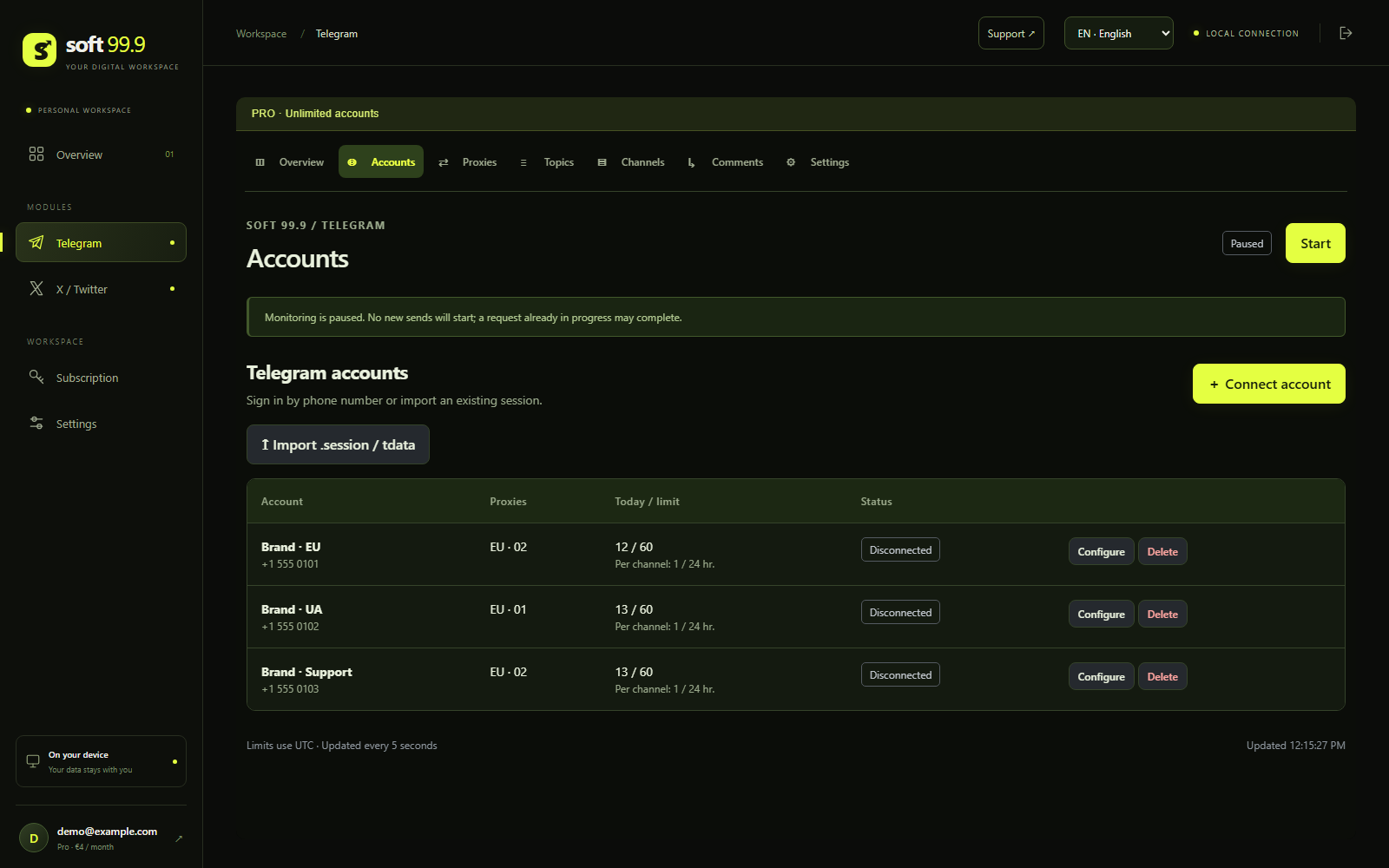
Accounts

Connection, proxy, daily limit and status of each account.

Soft 99.9 interface, demo data
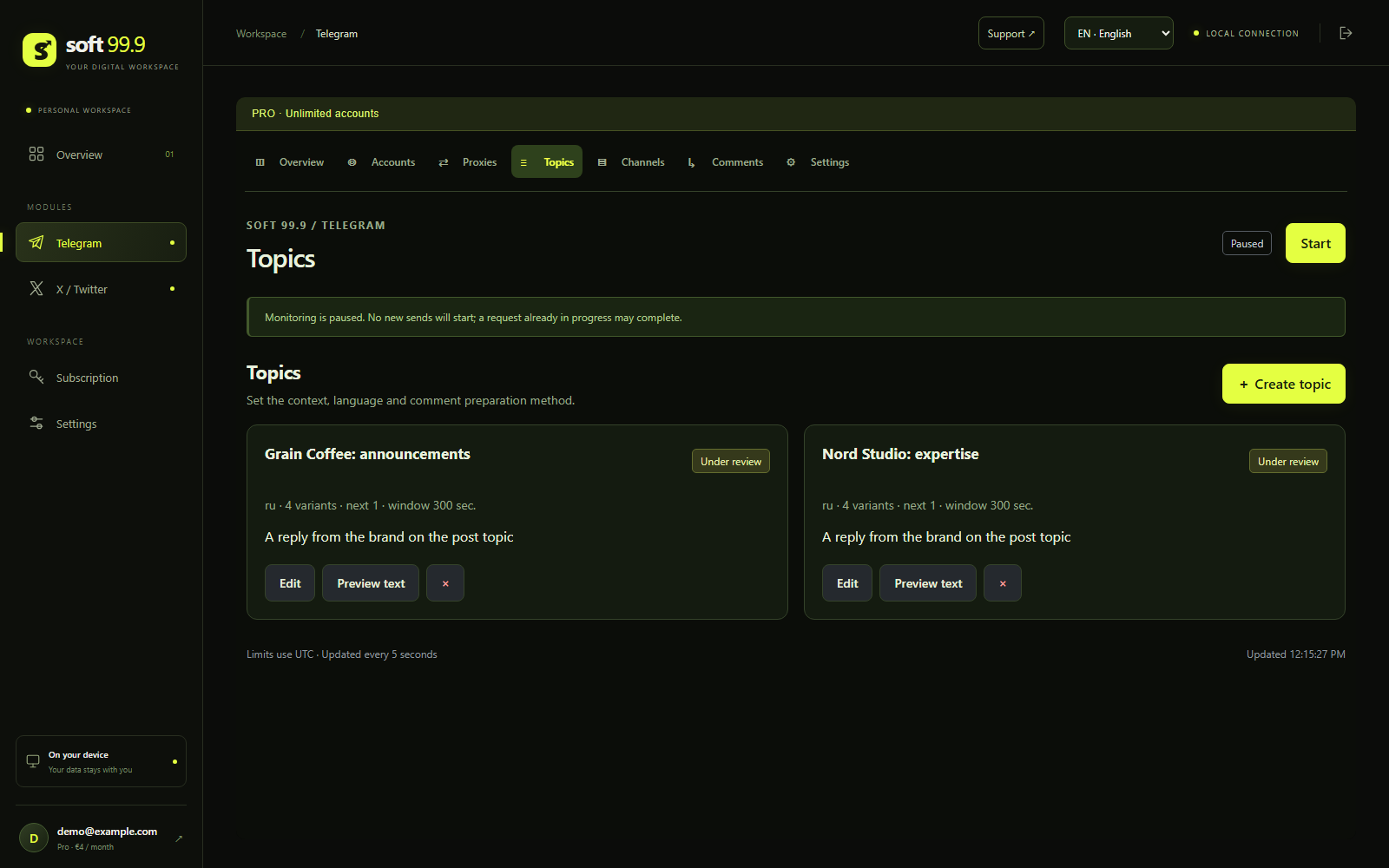
Topics

Text variants and mode: review before sending or automatic.

Soft 99.9 interface, demo data
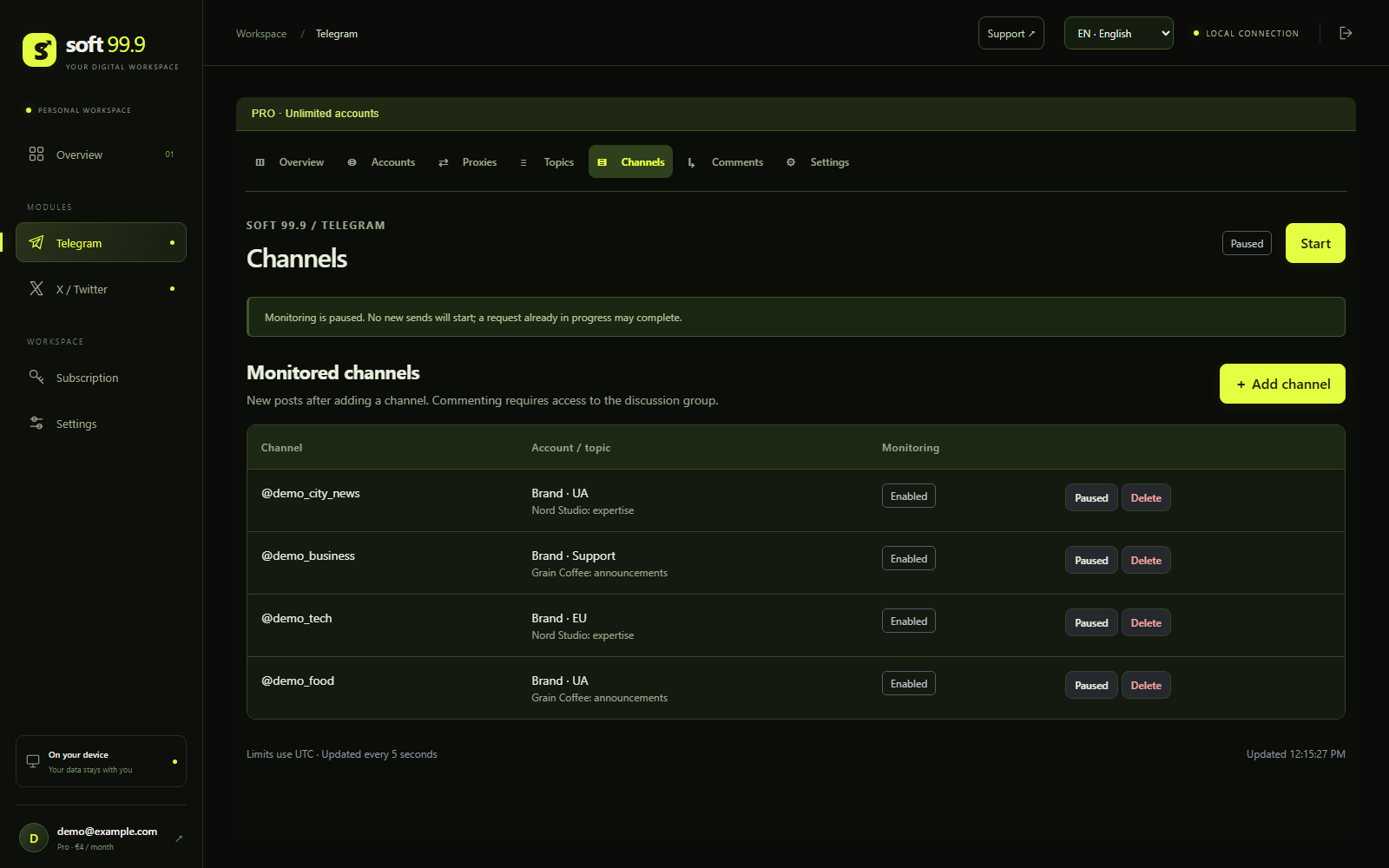
Channels

Which channels the client watches and from which account.

Soft 99.9 interface, demo data
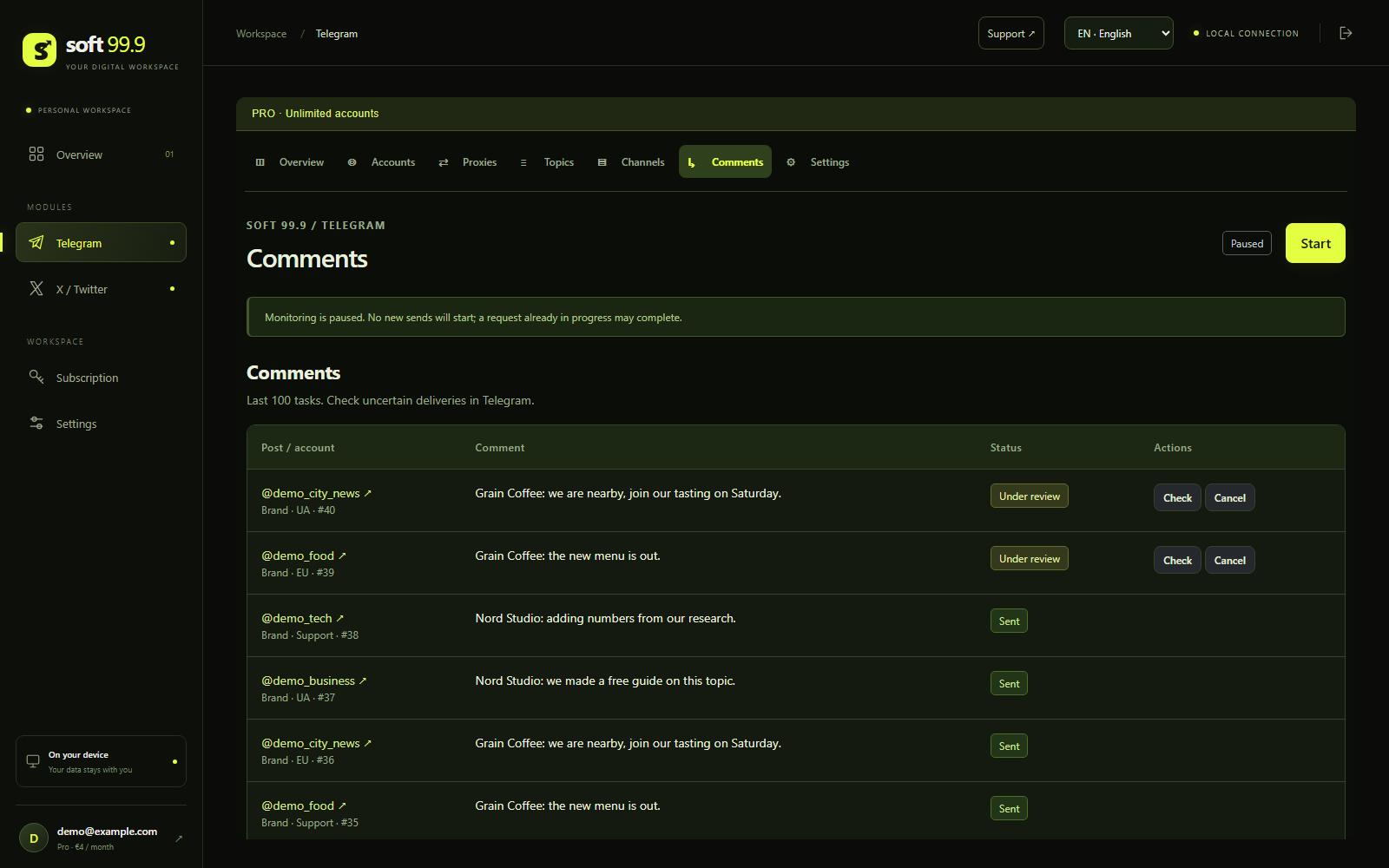
Comments

Queue, sending log and status for every post.

04 / LOCAL FIRST

Your sessions stay
on your PC.

Soft 99.9 runs on your device. X profiles, Telegram sessions, proxies and settings stay off our server.

  • Modules run locally
  • The server checks your account and plan
  • One Soft 99.9 account — one device

An internet connection is needed to sign in and periodically verify access.

CloudAccount · plan
ACCESS CHECK
YOUR WINDOWS PC
Telegram+ X / Twitter
Sessions · profiles · settings
NO SERVER RENTAL FOR THE MODULES
05 / FREE AND PRO

Try it first.
Then decide.

Free: 1 Telegram + 1 X account.
Pro: unlimited connected accounts
with no fee per account.

SOFT 99.9 / FREE

Try both modules.

0 €no time limit

Explore both modules
on your computer.

  • 1 Telegram account
  • 1 X / Twitter account
  • Core features in both modules
  • 1 device
No card. No trial period.
SOFT 99.9 / PROPRO

Unlimited accounts.

4 €/ month

Unlimited connected Telegram accounts and X profiles.
Add accounts without paying per account.
Concurrent workload depends on your PC.
One subscription — one device.
The Tribute fee and total are shown on the payment page.

  • Unlimited Telegram accounts
  • Unlimited X / Twitter profiles
  • Everything in Free
  • 1 device
Link Telegram and pay for Pro from the client or your account page.

When Pro ends, your data stays. Choose one account per platform and continue on Free. Concurrent load depends on your computer.

SAFETY / FILE CHECK

Not sure?
Check the file yourself.

The installer is not yet signed by a publisher, so Windows may show a warning. Do not take our word for it: check the file before running it.

VirusTotal01

Check again yourself.

  1. Download the installer, but do not run it.
  2. Open VirusTotal and choose the downloaded file. It is free and accepts files up to 650 MB.
  3. Read the report from dozens of antivirus engines and decide for yourself.
Check on VirusTotal ↗
SHA-25602

Make sure the file is authentic.

Run this in PowerShell in your download folder and compare the result with the checksum below.

Get-FileHash .\Soft-99.9-Setup-0.5.4-x64.exe719ab7fba72d23435be2cda563fa1943f91126121cfc3cb0a8d9f94ba95b401e
06 / BEFORE YOU START

Answers
without guesswork.

Need help? ↗
Is this a desktop app or a browser service?+

This is a Windows application with its own window. The website provides downloads and your account. Telegram and X tasks run on your computer.

How can I check the app for viruses?+

The VirusTotal report for the current installer is in “Check the file yourself”. The SHA-256 is there too: compare it with your file. You can also upload the file and scan it again. If an antivirus flags it, send the report to support.

What is included in Free?+

One Telegram account and one X profile with the core features of both modules. No card, no expiry. Pro has no plan limit on connected accounts. Concurrent load depends on your computer.

Do I need to install Python or other libraries?+

No. The installer includes Python, Node.js, Chromium and required dependencies. You do not need to extract a ZIP manually; profiles and data stay in a separate folder.

Why do I need both a Soft 99.9 account and Telegram?+

Your Soft 99.9 email account holds your plan and device binding. You add Telegram and X accounts to use the modules. Linking Telegram for payment connects your Tribute subscription to your Soft 99.9 account.

How many accounts can run at the same time?+

Free includes one Telegram and one X account. Pro has no plan limit on connected accounts. How many you can comfortably run at once depends on your computer and settings.

What happens when I close the application?+

When closing the window, choose To tray to keep tasks running, or Quit to stop the application and its background processes. Stop Soft 99.9 is also available. Your computer must stay on and connected to the internet for tasks to run.

How do I pay for Pro, and what happens when it expires?+

Open Subscription in the client or your account on the website, link Telegram and proceed to Tribute. The price is €4 per month plus the Tribute fee. When Pro expires, your data stays: select one account per module for Free.

Can I move my subscription to another PC?+

One account is bound to one device. Contact support to transfer it. Signing out does not remove the binding.

Are traffic or ban-free operation guaranteed?+

No. Soft 99.9 automates workflows but does not control platform rules, reach or audience response. Results depend on your content, accounts and settings.

What should I send support when something goes wrong?+

Send the client version, module name, what you were doing and a screenshot of the error without personal data. Do not send passwords, API Hash, login codes, session files or auth_token.
SUPPORT / TELEGRAM

Have a question?
Talk to us.

Get help with installation, access and client errors.

Contact support @mixininparadise

Include your version and module. No passwords or session files needed.

START WITH FREE

Try the software
on your own workflow.

Windows 10 / 11 x64 · 1 Telegram + 1 X · no payment

SOFT 99.9 / ACCOUNT

Welcome back.

Use the same account as in the app.

Soft 99.9 only receives your verified email and basic profile details. It never gets your Google password or asks for Gmail or Drive access.

or continue with email

Free includes 1 Telegram + 1 X account. Confirm your email using the link we send.

SOFT 99.9 / INFO